What is GitOps?
If you’ve been navigating the ever-evolving landscape of modern software delivery, you’ve likely heard the term “GitOps” buzzing around—but what exactly is it? At its core, GitOps is an operational framework that takes the DevOps best practices we already rely on for application development—like version control, collaboration, and CI/CD—and applies them directly to infrastructure automation. By using a Git repository as the single source of truth for your declarative infrastructure and applications, software agents can automatically ensure that your live environment matches the desired state defined in your code. This means that your deployments become faster, your environments become easily reproducible, and every single change is entirely auditable. In this post, we’ll dive into how GitOps works, why it’s becoming the standard for cloud-native ecosystems, and how it can streamline your delivery pipeline.
Types of Clusters
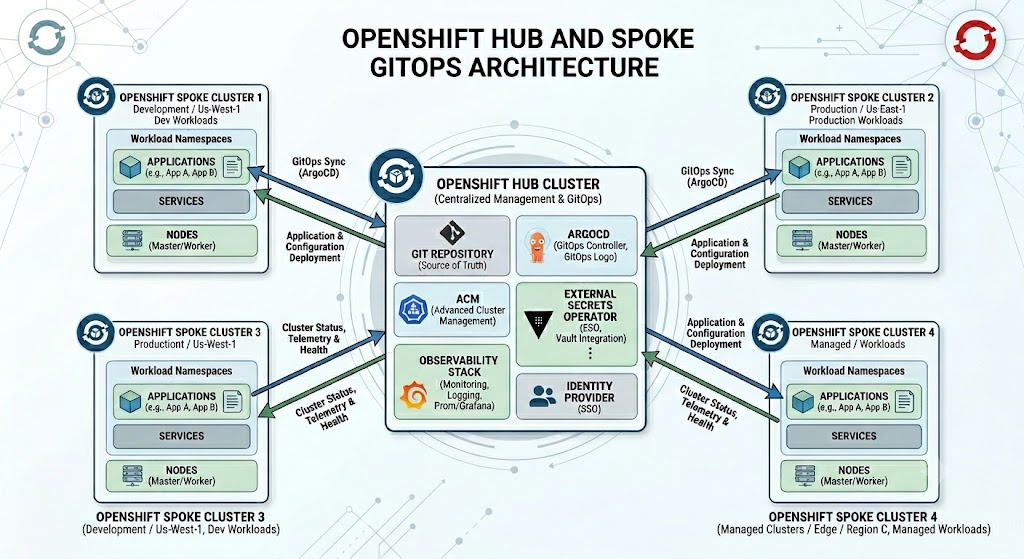
When scaling GitOps across an enterprise, you’ll typically see infrastructure organized into a “hub and spoke” architecture consisting of two distinct types of clusters. The hub cluster acts as your central command center; instead of running end-user applications, it is dedicated to hosting the critical management tools, centralized observability stacks, and GitOps controllers (like Argo CD or Flux) that oversee your entire ecosystem. Surrounding it are the spoke clusters—often referred to as workload or managed clusters—which are the distributed environments across various regions, clouds, or edge locations where your actual business applications and microservices run. The fundamental difference lies in their responsibilities: the hub provides centralized governance, policy enforcement, and deployment orchestration, while the spokes handle the heavy lifting of executing your production workloads, continuously synchronizing with the central hub to ensure they match your Git repository’s desired state.
Types of Configurations
Once a cluster is successfully spun up, it isn’t immediately ready to host business applications; it must go through a bootstrapping process that bridges the gap between a vanilla installation and a fully operational environment. This is where two distinct layers of configuration come into play: platform and workload. Platform configurations represent the foundational “plumbing”—typically managed by platform engineering or operations teams. These include essential cluster-wide add-ons like ingress controllers, security and policy enforcement tools (like OPA or Kyverno), observability agents, and the GitOps operators themselves, all of which transform the bare cluster into a secure, governed ecosystem. Once that foundation is primed and the guardrails are in place, the cluster is ready for workload configurations. These are the actual business applications, microservices, and application-specific resources (like ConfigMaps or routing rules) deployed by development teams. Ultimately, the difference boils down to scope and ownership within your GitOps repositories: platform configurations pave the secure road and establish the rules of the road, while workload configurations are the vehicles driving on it, delivering actual features and value to your end users.
Personas
To make this entire ecosystem run smoothly, a clear separation of duties is essential, driven by two distinct personas: platform engineers and application developers. Platform engineers act as the custodians of the infrastructure, managing the foundational cluster components, security policies, and the GitOps tools themselves. Conversely, application developers are focused on delivering business value and are responsible for their specific application manifests. In a mature GitOps model, this division of labor is physically enforced at the repository level. Each development team is typically granted their own dedicated Git repository for their workloads. The platform team facilitates this autonomy by simply provisioning an Argo CD Application resource in the platform repo that points directly to the developers’ repository, effectively handing over the keys to that specific deployment lifecycle. This architecture enforces a strict security boundary—application teams have full self-service capabilities to trigger deployments, scale services, and roll back changes within their own domain, but they do not have read or write access to the core platform GitOps repositories. By isolating application configurations from foundational infrastructure, enterprises significantly reduce the “blast radius” of potential misconfigurations, prevent accidental tampering with critical cluster operations, and empower developers to move at their own speed without waiting on an operations bottleneck.
Gitops Platform Structure
gitops-platform/
├── clusters/
│   ├── hub/
│   │   ├── preproduction/
│   │   │   ├── applications/
│   │   │   │   ├── application1.yaml
│   │   │   │   ├── application2.yaml
│   │   │   │   └── kustomization.yaml
│   │   │   ├── application1/
|   |   |   |   ├── patch1.yaml
│   │   │   │   └── kustomization.yaml
│   │   │   ├── application2/
│   │   │   │   └── kustomization.yaml
│   │   │   └── app-of-apps.yaml
│   │   └── production/
│   └── spoke/
│       ├── development/
│       ├── integration/
│       └── production/
├── resources/
│   ├── application1/
│   │   ├── kustomization.yaml
│   │   ├── namespace.yaml
│   │   ├── operator-group.yaml
│   │   └── subscription.yaml
│   └── application2/
│       ├── kustomization.yaml
│       ├── namespace.yaml
│       ├── operator-group.yaml
│       └── subscription.yaml
├── bootstrap.yaml
└── README.md
Let’s walk through this structure to see the sometimes difficult to understand inter-dependencies in the configurations.
Bootstrapping
Transitioning from a newly provisioned cluster to a fully automated environment requires an essential first step known as the bootstrap process. This step exists to solve a classic “chicken and egg” dilemma inherent to the methodology: GitOps relies on an in-cluster software agent (OpenShift GitOps) to continuously pull and apply configurations from your Git repository, but if you use GitOps to manage all your cluster software, how do you deploy the GitOps agent itself? The bootstrap process bridges this gap through a one-time, imperative action—often executed via a CLI tool or an infrastructure-as-code tool like Ansible—that installs the initial GitOps controller into the bare cluster and securely points it to your primary platform repository. The moment this initial connection is established, the controller takes over, immediately pulling down the foundational platform configurations to “hydrate” the cluster with observability tools, security policies, and application pathways. Once bootstrapped, the declarative GitOps loop is fully engaged, and the agent can even manage its own future upgrades, allowing you to completely lock down the cluster from direct manual intervention.
As part of this bootstrapping phase, there is often a critical prerequisite that must be handled before the GitOps agent is even installed: secret management. Because your GitOps controller needs secure access to pull configurations from private Git repositories, it requires authentication credentials from the moment it wakes up. To solve this safely, platform teams typically bootstrap the OpenShift External Secrets Operator (ESO) and configure a foundational ClusterSecretStore first. By establishing this secure bridge to your enterprise secrets manager (like HashiCorp Vault) ahead of time, the GitOps operator can dynamically retrieve its repository credentials the instant it is deployed. From a security standpoint, it is critical to avoid using static, long-lived personal access tokens for these connections. Instead, this initial configuration should leverage short-lived tokens—such as those dynamically generated via GitHub Apps, OAuth integrations, or ephemeral service accounts—ensuring that the keys to your GitOps kingdom are continuously rotated, strictly scoped, and inherently secure from day one.
Speaking of chickens and eggs, you will also run into the ordering issues related to applying operator subscription manifests and custom resources associated with operator. The Subscription apply triggers the operator install which also triggers the CustomResourceDefinitions (CRD) associated with the operator. If you try to apply a CustomResource (CR) for the operator prior to the CRDs being present, the API will reject the request. So the bootstrap process ends up with several imperative waits to ensure the CRDs are there and the controllers are ready.
- name: Apply external-secrets-operator manifests
  kubernetes.core.k8s:
    state: present
    src: "{{ item }}"
  loop:
    - resources/external-secrets-operator/namespace.yaml
    - resources/external-secrets-operator/operator-group.yaml
    - resources/external-secrets-operator/subscription.yaml

- name: Wait for external-secrets-operator CSV to succeed
  kubernetes.core.k8s_info:
    api_version: operators.coreos.com/v1alpha1
    kind: ClusterServiceVersion
    namespace: external-secrets-operator
    label_selectors:
      - "operators.coreos.com/openshift-external-secrets-operator.external-secrets-operator"
  register: csv_result
  until:
    - csv_result.resources | length > 0
    - csv_result.resources[0].status.phase | default('') == 'Succeeded'
  retries: 30
  delay: 10
The App of Apps Pattern
As your GitOps footprint expands across multiple teams and environments, managing individual deployments one by one quickly becomes unscalable. This is where the “App of Apps” pattern—a powerful declarative technique popularized by tools like Argo CD—comes into play. Instead of manually configuring each deployment, you create a single “root” or “parent” application whose sole job is to deploy other applications. This parent points to a Git directory containing the YAML manifests for your “child” applications, which in turn contain the actual configurations for your platform tools or business workloads. When the GitOps controller synchronizes the parent, it automatically cascades down, spinning up the child applications and fully hydrating the cluster. This recursive approach is a game-changer for enterprise scalability; adding a new platform tool, onboarding a new development team, or even replicating an entire cluster environment becomes as simple as committing a new application manifest into the root repository, keeping your entire architecture cleanly organized and fully version-controlled.
For our preproduction hub cluster, the root application looks like this.
apiVersion: argoproj.io/v1alpha1
kind: Application
metadata:
  name: app-of-apps
  namespace: gitops-platform
  annotations:
    argocd.argoproj.io/sync-wave: "0"
spec:
  project: default
  source:
    repoURL: https://github.com/exarep/gitops-platform.git
    path: clusters/hub/preproduction/applications
    targetRevision: main
  destination:
    server: https://kubernetes.default.svc
    namespace: gitops-platform
  syncPolicy:
    automated:
      prune: true
      selfHeal: true
The big takeaway here is that the path: clusters/hub/preproduction/applications references a folder in that git repository that contains a kustomization.yaml file that enumerates the other ArgoCD Application CRs for that cluster.
Walking the Kustomization Tree
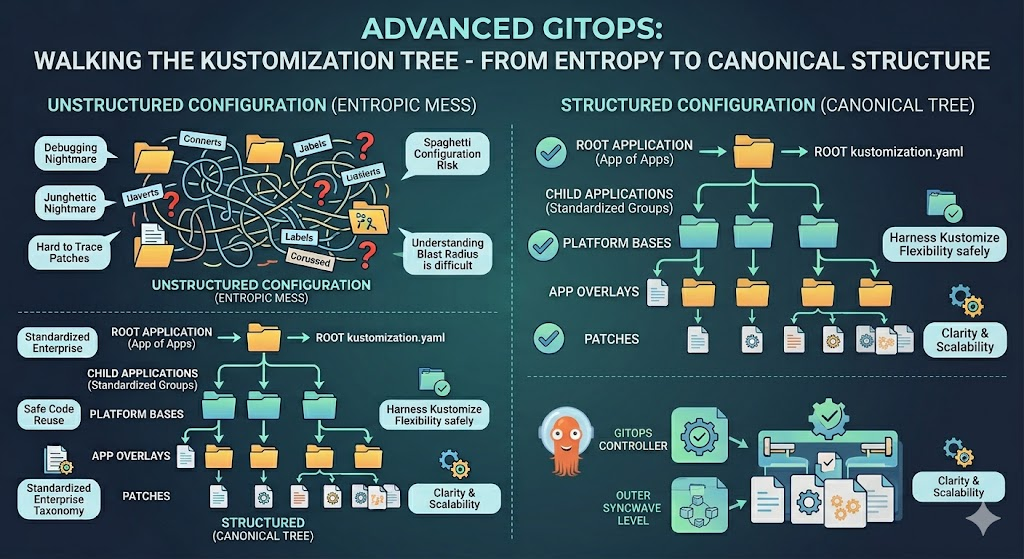
While the “App of Apps” pattern serves as the vital root of your deployment tree, the way it branches out can quickly become highly complex. Once the root application is established, the rest of the synchronization process focuses on loading the subsequent child applications. In a typical GitOps workflow, each of these child applications points to a specific Git directory governed by a kustomization.yaml file. Because Kustomize natively supports deep architectural hierarchies, these base files often contain resource entries that point to entirely different directories, which in turn contain their own kustomization.yaml files. This creates a deeply nested, fractal-like web of configurations where manifests are continuously layered, patched, and overridden across multiple levels.
While this recursive capability is incredibly powerful for reusing code and adapting workloads across different environments, it also introduces a massive structural risk. If every platform engineer, application team, and individual contributor is allowed to design their own inheritance trees and folder hierarchies based on personal preference, your repository will rapidly deteriorate into an unmaintainable, entropic mess of “spaghetti” configurations. When that happens, tracking down where a specific patch originates or understanding the blast radius of a single commit becomes a debugging nightmare.
This is precisely why establishing a strict, canonical enterprise directory structure from day one is absolutely critical. By enforcing a standardized, organization-wide taxonomy for where base manifests live, how environment-specific overlays are applied, and how applications are grouped, organizations can harness the full flexibility of Kustomize and the App of Apps pattern without sacrificing clarity, maintainability, or scalability.
In our example, we end up with the root application pointing to the root kustomization, which brings in the other applications, each pointing to their own kustomizations which then points to the resources roots, which have their own kustomizations but also includes patches.
Double Syncwave Loops
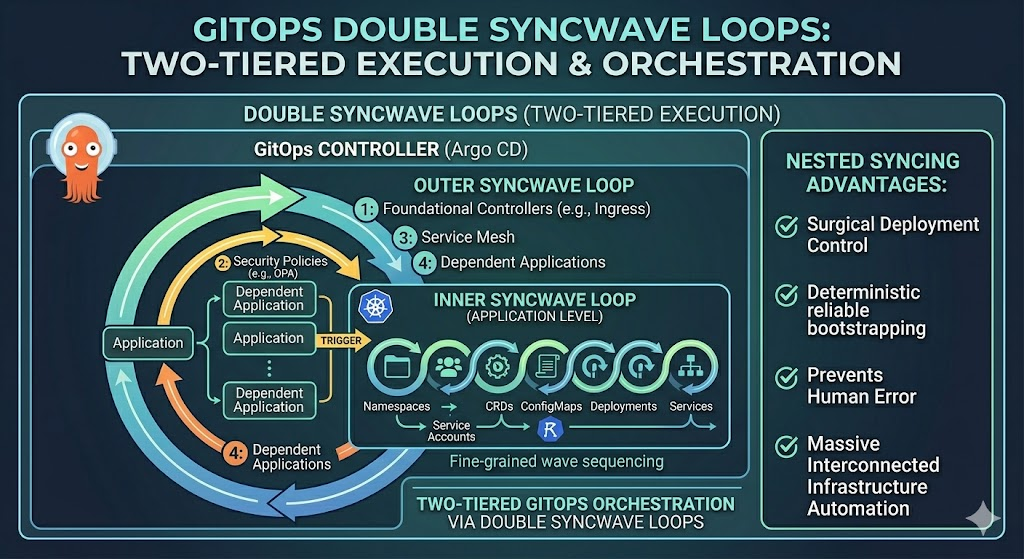
To orchestrate complex deployments where dependencies strictly matter, GitOps controllers like Argo CD utilize a powerful, two-tiered execution model that effectively creates a double syncwave loop. The first layer of this loop operates at the “App of Apps” root level; here, the outer syncwaves dictate the precise order in which the child Application resources are registered in the cluster—ensuring, for example, that foundational platform controllers are completely synchronized before any dependent business applications are even introduced. However, the orchestration doesn’t stop there. Once a child application is triggered by the outer loop, it immediately initiates its own internal syncwave loop. This inner loop manages the fine-grained sequencing of the actual Kubernetes manifests within that specific application, ensuring that prerequisites like Namespaces, ServiceAccounts, and Custom Resource Definitions (CRDs) are firmly established before spinning up the Deployments and Services that rely on them. Together, this nested syncing strategy gives platform engineers surgical control over the deployment lifecycle, allowing a massive, interconnected infrastructure to reliably bootstrap itself in a perfectly sequenced, deterministic cascade without human intervention.
Summary
Scaling GitOps across an enterprise is about much more than simply pointing a controller at a repository; it requires deliberate architecture, strict governance, and a deep understanding of deployment mechanics. From establishing a clear hub-and-spoke topology and safely bootstrapping the cluster with secure secret management, to enforcing the vital separation of duties between platform engineers and application developers, every structural choice matters. By leveraging advanced declarative patterns like the App of Apps, enforcing canonical Kustomize directory structures, and mastering the double syncwave loop, organizations can tame the inherent complexity of distributed systems. Ultimately, when these foundational pieces are meticulously integrated, GitOps transforms from a deployment methodology into a formidable, automated engine that drives secure, scalable, and highly resilient cloud-native ecosystems.
One comment
Comments are closed.